Control every hour,
at every venue.
Rostering and clock-in for hospitality groups that want a say in how their staff’s hours are run. Set it up the way each venue works and only count clock-ins made on site, with shifts posted to your team’s WhatsApp group coming soon.
Early access is opening to venues a few at a time. One email when your spot is ready, nothing else.

Off-the-shelf rostering makes every venue run the same way.
- Your pub, your café and your function venue all run differently, but the software treats them as one.
- Shifts still get posted in the group chat, and the chat never quite matches the roster.
- Hours are typed into the accounting software by hand, every pay run.
One roster, on the manager’s screen and every staff phone.
Managers run tonight from the dashboard. Staff see their shift and clock in from the app, and the button only works once they’re on site.

Set it up the way each venue actually runs.
Every venue in the group gets its own hours, sections and settings. You decide how time is rounded, who can swap shifts, and how close someone has to be to clock in. Head office sees it all in one place.
- Trading hours per venue. The roster shows closed hours as closed and counts coverage against the hours you’re open.
- Your sections. Bar, floor, kitchen, gaming, functions: the roster is laid out by the places you staff.
- Rounding you choose. Owners set how clock-ins round, from the settings page.
- Roles and approvals. Decide who can build the roster, who approves swaps, and who sees what.
- A boundary for every venue. Draw it on the map; clock-ins outside it are held for a manager.
- Staff availability. Staff say which days they can work, and the roster warns before you book them anyway.
- Trading hours
- Mon–Thu 11:00–23:00, Fri–Sat 11:00–01:00, Sun 11:00–22:00
- Sections
- BarFloorKitchenGaming
- Rounding
- Nearest 5 minutes
- Shift swaps
- Manager approves
- Clock-in boundary
- Drawn around the building
- Announce shifts to
- The Oxford crew (WhatsApp) Coming
Bar: Mia, Tom, Ana
Floor: Priya, Jack
Kitchen: Luca, Sam
Check your shifts in the app.16:02
Works with the tools your team already uses. Coming
Your staff live in the group chat, and your books live in accounting software. Kaslu Work is being built to meet them there.
- WhatsApp shift bot. New rosters, changes and open shifts posted straight into the team’s group chat.
- Accounting and payroll. Approved timesheets sent to Xero, MYOB or Employment Hero / KeyPay, instead of retyped.
- Point of sale. Sales from Square and H&L next to the wage cost for the same shift.
- Calendar feed and SMS. Shifts in your staff’s own calendar, and a text for anyone not on WhatsApp.
Using something else? Tell us when you join the waitlist. The integrations people ask for are the ones we build first.
No passwords to forget. Just an email and a code.
Staff sign in with the email address their manager has for them, then type the six-digit code we send. Managers sign in the same way on the web.
-
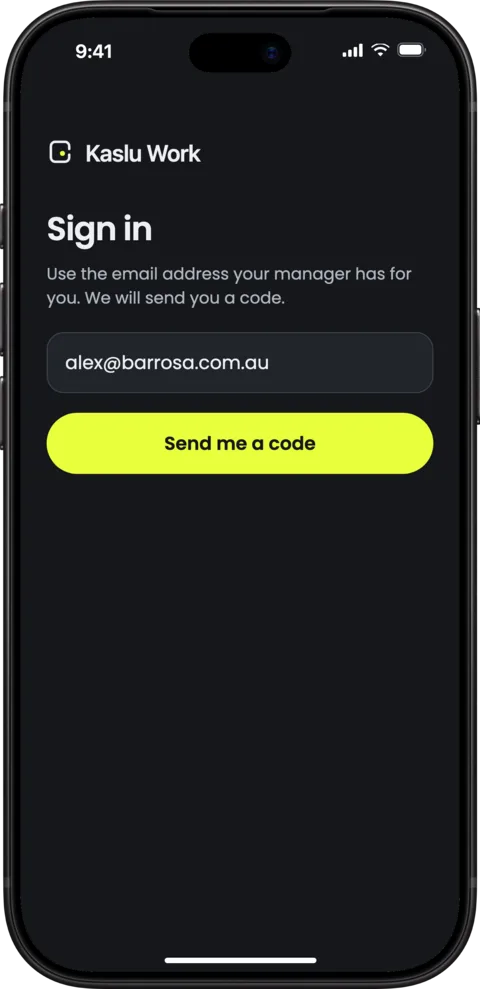
Enter your work email -
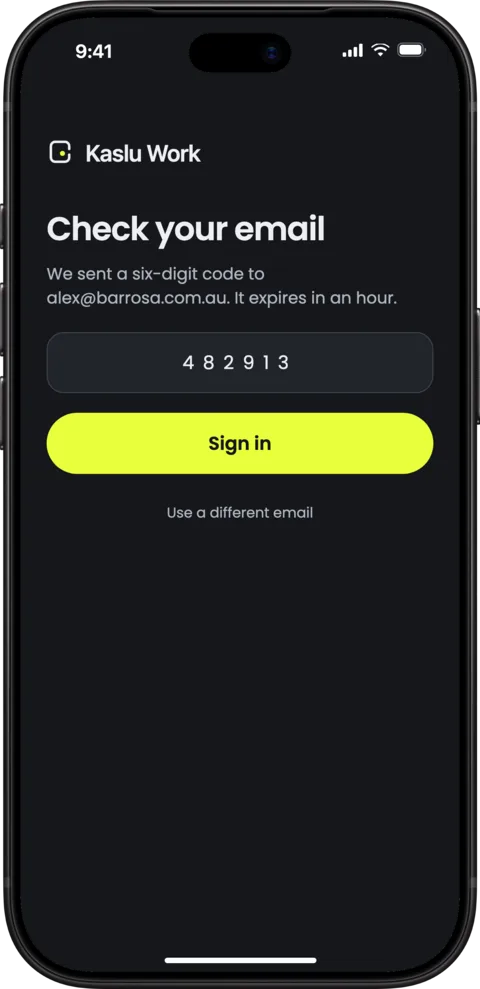
Type the six-digit code from your inbox -
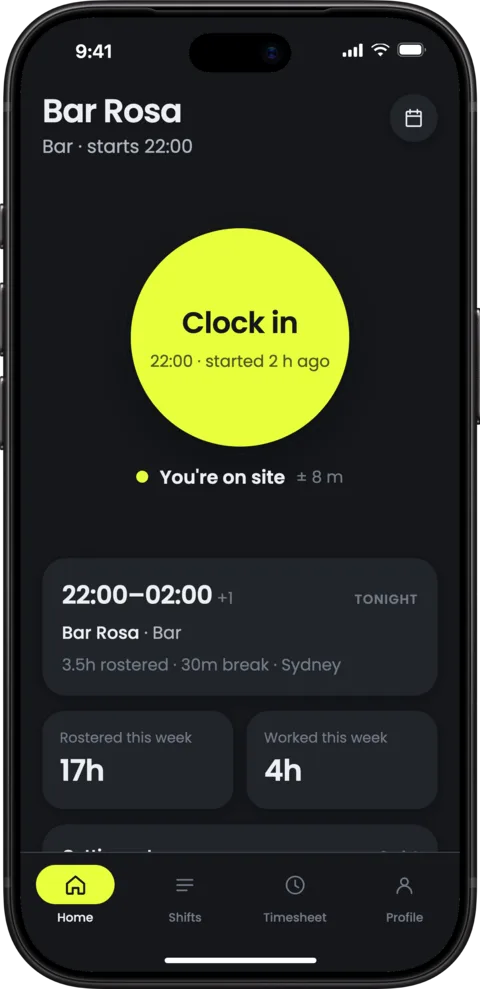
Clock in once you’re on site


Everything a venue needs on a Friday night.
- Rosters by place
- The bar, the floor and the kitchen are the rows, so a gap in cover is obvious before you publish.
- Geofenced clock-in
- A clock-in counts only inside the venue’s boundary. Anything outside is held for a manager instead of being paid by default.
- Drag, drop, publish
- Move a shift to another section or day, fill an empty one from the list of who’s free, and publish to every phone at once.
- Swaps and open shifts
- Staff swap and pick up shifts themselves. You approve, and nobody has to ring around.
- Hours you can trust
- Worked hours come from the clock, next to what was rostered. Every manager change is recorded, and approved timesheets export to CSV.
- Works without signal
- Clock-ins made in the cool room or the basement are saved on the phone and sync when it reconnects.
Up and running before next week’s roster.
Add your venues
Draw each venue’s boundary, set its trading hours and sections, and invite the team.
Build and publish the roster
Copy last week, fill the gaps from who’s available, and publish. Everyone gets it on their phone.
Staff clock in; you approve the hours
Clock-ins only count on site. Review anything held, then export approved hours for payroll.
Questions
Who is Kaslu Work for?
Hospitality groups and venues in Australia (pubs, bars, restaurants, cafés and function venues) that want control over how their staff’s hours are rostered, recorded and paid.
Can I set it up differently for each venue?
Yes. Each venue has its own trading hours, sections, clock-in boundary and settings, and you choose how hours round, who approves swaps and who can see what. Head office sees every venue in one place.
Will it post shifts to our WhatsApp group?
That’s on the way. The WhatsApp shift bot will post new rosters, changes and open shifts straight into your team’s group chat, with SMS for anyone who isn’t on WhatsApp.
Which accounting and payroll software will it connect to?
Xero, MYOB and Employment Hero / KeyPay are first on the list, plus Square and H&L for sales. Until then, approved timesheets export to CSV. Tell us what you use when you join the waitlist; the integrations people ask for are built first.
How does geofenced clock-in work?
You draw a boundary around each venue. When someone clocks in on their phone, Kaslu Work checks they are inside it. If they are not, the clock-in is held for a manager to review instead of being silently accepted.
Do you track staff location all the time?
No. Location is checked at the moment someone clocks in, clocks out or takes a break, and at no other time.
What if there is no signal in the cool room or the basement?
Clock-ins are saved on the phone and sent when it reconnects, with the time and place they actually happened.
Do my staff need to download an app?
Yes, a free app for iPhone and Android. They sign in with their email and a six-digit code, with no password. Managers use any browser.
Does it run payroll?
No. Kaslu Work records the hours your staff actually work and gets them approved. Your payroll or accounting software pays them.
When can I start using it?
We are letting venues in a few at a time. Join the waitlist and we will email you when your spot opens.
How much will it cost?
Pricing will be published before early access opens. Everyone on the waitlist hears first.
Get Kaslu Work for your venue.
Tell us about your venues and the software you use, and we’ll let you know when there’s room for your team.